Tantrum Audio NEXUS room correction processor — yellow front panel with signal and status indicators
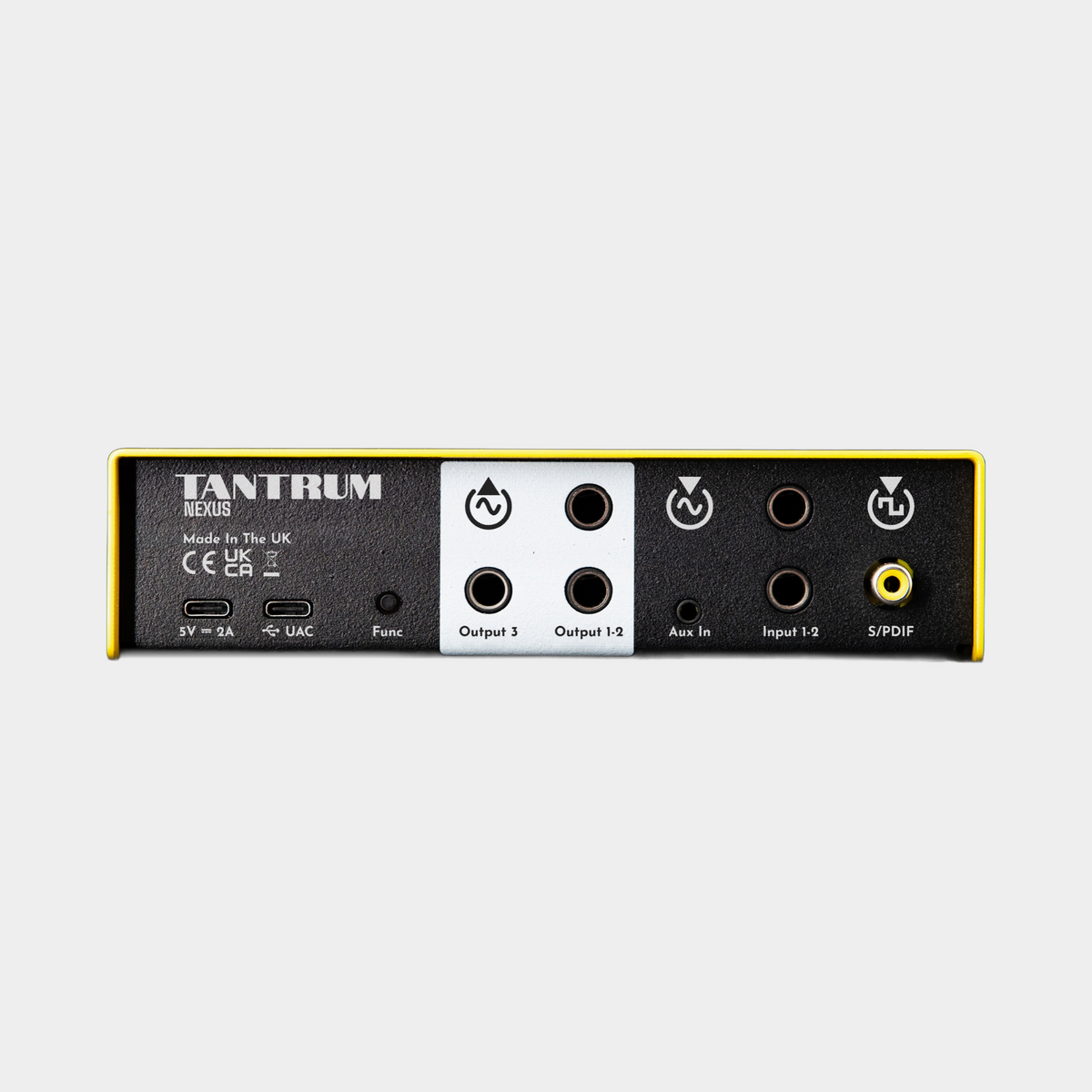
Tantrum Audio NEXUS rear panel showing balanced inputs and outputs, aux input, S/PDIF and USB-C

Tantrum Audio

Tantrum Audio NEXUS Room Correction Processor & Monitor Controller

Sale price£429.00 inc VAT
£357.50ex VAT
SKU: NEXUS
AVAILABLE TO ORDER
Preorder - NEXUS ships in November
Quantity:
Powered by
Finance Available From £0.00 per month
✕
Omni Retail Finance Logo

Omni Capital Finance Calculator

Finance option:
0% APR
12 months only
9.9% APR
12 / 24 / 36 / 48 months
14.9% APR
12 / 24 / 36 / 48 months
Cash price £0.00, deposit £0.00. Borrowing £0.00 over 12 months with a representative APR of 0.00% APR and a rate of interest of 0.00%, the monthly payments will be £0.00 and the total amount payable will be £0.00.
Deposit Percentage:
10%
10% 50%
Term:
Months
12
12m 24m 36m 48m
Estimated Monthly Payment:
£0.00
Price of Goods
£0.00
Deposit to Pay
£0.00
Loan Value
£0.00
Rate of Interest
0.00%
Total Amount Payable
£0.00
Total Interest Payable
£0.00

Accepted payments

  • American Express
  • Apple Pay
  • Bancontact
  • Diners Club
  • Discover
  • Google Pay
  • Maestro
  • Mastercard
  • MB WAY
  • PayPal
  • Shop Pay
  • Union Pay
  • Visa

Product overview

TANTRUM AUDIO · NEXUS

One monitoring system.
Every source in focus.

The Tantrum Audio NEXUS brings room correction, speaker alignment and monitor control together in a compact hardware processor. Connect your audio interface, computer or external player, then send the corrected signal to your monitors and subwoofer. The EQ, crossover and alignment run inside NEXUS, giving your different playback sources a consistent monitoring path.

HARDWARE ROOM CORRECTIONSTEREO + SUB INTEGRATIONOMNISSIAH INCLUDED
Tantrum Audio NEXUS hardware room correction processor in a studio setting

WHY NEXUS?

A permanent place for your calibration.

01 / INDEPENDENT OF YOUR DAW

Correction that stays with your speakers.

Save the calibration to NEXUS and it continues processing on its own. Change sessions or use an external playback source and the monitoring correction is still there.

02 / STEREO + SUB

Make the system work together.

Three outputs, a configurable crossover and per-output alignment let you integrate a stereo pair with a subwoofer, or use the third output for a mono reference speaker.

03 / SOFTWARE INCLUDED

Measure, understand, refine.

Omnissiah handles measurement and setup, with plain-language explanations of its correction decisions. It is included with NEXUS, with no subscription required.

YOUR SOURCES, CONNECTED

Put NEXUS at the centre of your listening.

Use the balanced stereo line inputs for your existing audio interface or console, USB audio for computer playback, coaxial S/PDIF for a digital source, and the 3.5 mm stereo auxiliary input for a phone or external player. USB and S/PDIF send audio directly to the processor without first converting it to analogue.

Outputs 1 and 2 feed your powered monitors or power amplifier. Output 3 can feed a subwoofer, mono reference speaker or utility destination. With maximum levels of +20 dBu at the main analogue inputs and +18 dBu at the outputs, NEXUS is designed to sit in a professional line-level monitoring chain.

Used downstream of your audio interface as a monitor processor, the correction changes what you hear through the speakers; it is not an insert in your DAW mix or part of a normal in-DAW export.

Tantrum Audio NEXUS rear panel showing balanced inputs and outputs, aux input, S/PDIF and USB-C

ROOM MEASUREMENT & CORRECTION

Understand what your room is doing.

Omnissiah is the measurement and configuration software included with NEXUS. Measure your speakers in the room, build the correction and write the settings to the hardware over USB-C. Once configured, NEXUS keeps running independently of the computer.

Each channel receives a diagnostic card explaining what the software corrected, what it deliberately left alone and why. That makes it easier to distinguish problems that respond to filtering from those that need attention to speaker placement or acoustic treatment.

Room correction complements a well-set-up listening space. It can help control correctable peaks and improve tonal balance, while the diagnostics help you avoid trying to solve every acoustic problem with more EQ.

CROSSOVER, PHASE & TIMING

Bring your monitors and subwoofer into alignment.

Adding a subwoofer involves more than extending the bass response. Its level, crossover and arrival time need to work with the main monitors. NEXUS brings those adjustments into one processor, with up to 10 ms of delay per output, all-pass phase correction and independent gain and polarity controls.

The DSP provides 15 filters per output, including parametric EQ and all-pass filters, alongside 24 dB/octave Linkwitz–Riley or Butterworth high-pass and low-pass crossover options. This gives you the tools to manage the overlap between the sub and mains and refine how they combine at the listening position.

Processing latency of approximately 1 ms keeps the additional delay small for recording and live monitoring. Your audio interface and DAW buffer still contribute their own latency.

NEXUS shown alongside a Stream Deck for configurable monitor-control workflows; controller sold separately
External control surface shown for illustration; sold separately. Remote-control workflows require appropriate MIDI/OSC software and controller configuration.

MAKE IT YOUR MONITOR CONTROLLER

Put the controls where you want them.

NEXUS supports configurable macros over MIDI and OSC, so compatible control surfaces, tablet apps and button controllers can become part of your monitoring workflow. Through Omnissiah, set up commands for master volume, source selection, output muting, preset recall or correction bypass.

Build a command to mute the sub, switch between your mains and a mono reference speaker, or compare corrected and uncorrected playback. Output gain, delay, polarity and crossover bypass can also be controlled, giving you scope to tailor the system to the way you work.

The front panel keeps things simple with signal and status indicators, while the audio and USB-C connections sit at the rear. The processing remains in the hardware; configuration and remote control provide the flexibility.

GETTING STARTED

Measure once. Keep the result in hardware.

Connect your system. Place NEXUS between your playback sources and powered monitors or amplifier, adding a subwoofer to the third output if required.

Measure and configure. Use Omnissiah and a suitable measurement microphone to assess the room, then configure correction, crossover and speaker alignment. Omnissiah supports macOS, Windows and Linux and works with measurement microphones from other manufacturers.

Save and listen. Write the settings to NEXUS and use the saved processing independently of the computer. Return to the software when you need to measure again or refine the setup.

Build around the monitors you already own.

NEXUS suits stereo monitoring and 2.1 systems with a subwoofer. It is a line-level processor, so passive speakers require a separate power amplifier. Omnissiah software is included; a measurement microphone, speakers and external controllers are not included with this listing.

A measurement microphone needs an appropriate connection to your measurement system; NEXUS’s analogue inputs are line-level inputs. Contact SX Pro for help matching it to your setup and for the latest availability.

Product information

Essential details

Weight
0.6 kg (unit weight)
Warranty
2 Years